Apache Juneau CVE-2026-121489: a file-system resource that does not stay in its folder, and what the default setting does not protect
Update, 5 November 2026: this note replaces the shorter note first published on this address earlier the same day. It adds a read of the code in 9.2.0 and 9.2.1, and one change of substance: that note said that if none of the three settings is on there is nothing to do. The record says the flaw bites when a setting is on. The 9.2.0 code, as we read it, also lets the directory-listing route through the same unsafe path without checking those settings. We have not run it. Until Apache says otherwise, treat a reachable DirectoryResource as in scope whatever its settings are.
Update 2, 5 November 2026: after an outside review, added the line references for every code claim, a plain statement of the four outcomes (read, overwrite, delete, and code execution as a possible later step only), a caution above the log searches that they are starting points, and a reminder to check the running service and not only the build. Nothing earlier was withdrawn. The listing-route reading is still ours and still not run.
Apache Juneau is a Java library that turns plain objects into JSON, XML, HTML and many other formats, and serves them as a web service. One of its parts is a ready-made web resource that shows, downloads, uploads and deletes files in a folder of the server. That resource did not keep requests inside its folder. On 5 November Apache published the record and gave it the highest score there is. The fix is out.
This note is for the person who owns a Java service, the person who pays for one, and whoever holds the build of a product that includes one. It is as of 5 November 2026. Every claim links to its source at the end, and where we are reasoning rather than quoting we say so.
The short version
- CVE-2026-121489 (CWE-22, path traversal), CNA Apache. The microservice DirectoryResource does not keep request paths inside its configured root directory. When an application turns on its view, upload or delete setting (each off by default), a client can read, write or delete files outside the root, anywhere the server process has access. CVSS 4.0, score 10.
- Versions through 9.2.0 are affected. The fix is 9.2.1. The record names two packages, juneau-microservice-core and juneau-commons. Move every org.apache.juneau jar you have to 9.2.1 together.
- Nothing public says the flaw is being used. CISA's catalogue had no entry, FIRST had no score yet, and the record is a few hours old when we read it. That is a statement about today. The fix is two small, public code changes, which is how flaws like this tend to be understood quickly.
- The resource has no login of its own in the 9.2.0 code. Whether a client can reach it is decided by how your application mounts it and what sits in front. That, not the score, is what to find out first.
- Two things the safe-by-default reading hides: the code route that lists a directory does not check the three settings, and a folder 'with nothing in it' does not help, because the escape leaves the folder.
 Free analysis report · 21 pagesApache Juneau path traversal: Assessment & Action PlanThe full version as an analysis report for whoever owns a Java service or its build: what the resource does, what we read in the 9.2.0 and 9.2.1 code, how to find it in a dependency tree, exposure by situation, what each common safeguard does and does not stop, and the search to run in your access logs.Download the analysis report →
What it is and where it sits
Juneau's own site describes it as a library that serialises a Java object to any of dozens of formats with one API and serves it over a web service, with a client, a configuration library and a way to expose services to AI agents over MCP. The resource in question lives in a module called juneau-microservice-core, and it is a small web page and API for browsing a folder: view a file, download it, upload (replace) one, delete one. Its own documentation comment calls it a 'REST resource that allows access to a file system directory'.
A developer turns it on by mounting the class in a service and giving it a root folder through the configuration property DirectoryResource.rootDir. Three more properties switch the powers on: DirectoryResource.allowViews, DirectoryResource.allowUploads and DirectoryResource.allowDeletes. In the code each defaults to false, which matches the record. We found no other way to set them in the 9.2.0 source: the class has no builder.
A resource like this is the kind of thing a team adds to look at logs, to hand out reports or to see an upload folder, and then forgets. Who has done so we cannot say. We found no public list of who runs Juneau and we did not read download counts, so we make no claim about the sectors or the sizes of its users. Because it is a library, it will not appear under a product name. It appears as a jar in a build, possibly inside a bigger jar or a vendor's package.
What the bug is
The vendor's text, quoted at the end, is short. The code is shorter. In 9.2.0 the method that turns a request path into a file does this, in effect: take the root folder's path, add a slash, add whatever the client sent, and if that file exists, return it. Nothing in it removes the parent-folder segment ('..'), refuses an absolute path, or checks where the result ended up. So a path that climbs out of the root resolves to a file outside it, and every route in the resource uses that one method.
The same line is in every release we read: 8.0.0, 8.2.0, 9.0.0, 9.0.1, 9.1.0 and 9.2.0. We did not read 8.1.x or the beta, or anything before 8.0.0. The record's range ('through 9.2.0', lower bound 0) matches what we found in the six we read.
The 9.2.1 change is the same method calling a new helper, FileUtils.resolveSafely, which lives in juneau-commons. Its comment says it rejects '..' segments, absolute paths and links that point out of the root. In plain terms it works out the real path of the root and of the target and refuses anything whose real path does not start with the root's. A path that escapes gets 403 Forbidden, a missing file gets 404.
Two practical points come from that. First, the fixed core calls a method that exists only in juneau-commons 9.2.1 (it is not in the 9.2.0 build we read), so the two jars must move together; our reading is that a mixed set fails or stays unfixed. Second, the fix is one funnel, which is why it is credible: view, download, upload, delete and the information route all go through the one method.
What the record says, and what we read in the code
| Question | The record | Our reading of the 9.2.0 code | How sure |
|---|---|---|---|
| What escapes the folder? | Read, write or delete, anywhere the server process has access, when view, upload or delete is on. | View and download read any file the process can read. Upload opens the target for writing, which empties it first, then writes. Delete removes a file, and a directory with everything under it. | High for the code; not tested |
| Can it create a new file outside the folder? | 'Write'. No further detail. | No. Every route first looks the file up, and the lookup throws 'not found' when it does not exist. Upload therefore replaces a file that already exists. The method's own comment says 'created or overwritten', and the code does not do the first. | High for the code; not tested |
| Do the settings protect the listing? | The flaw bites when a setting is on. | The route that shows information about a file or folder, and lists a folder's contents, does not check the settings. It would show names, sizes, modified times and the folder's full path for a folder outside the root. | Medium: reasoned from the source, not run, not stated by Apache |
| Is there a login? | Not stated. The vector says none needed. | The class has no role or login check in it. Whatever protects it is in the application or in front of it. | High for the class; what protects your deployment is yours to read |
| Does delete go beyond one file? | 'Delete files'. | It deletes a folder recursively: it walks the folder, deletes each item, then the folder. | High for the code; not tested |
Where to read it, so you can check us. In juneau-microservice-core 9.2.0, DirectoryResource.java: the settings are read at lines 211 to 213; the path method is getFile at line 315; the listing route is the getFile that takes the request, at line 251, and the three setting checks sit in the view, download, upload and delete routes (lines 232, 290, 269 and 302) and not in it; upload opens the target for writing at line 274; delete removes at line 311. In 9.2.1 the path method (line 330) calls FileUtils.resolveSafely, defined at line 61 of FileUtils.java in juneau-commons 9.2.1. Every route resolves its path through that one method, so on our reading the listing route is covered by the same change. We read that, we did not run it.
Four outcomes are easy to run together, and they carry different certainty. Reading a file outside the root: stated by the record and visible in the code. Overwriting a file that already exists and the process can write: in the code, not run. Deleting a file or a whole folder the process can delete: in the code, not run. Remote code execution: not stated by the record and not demonstrated by anyone; it is a possible later step, and only where the overwritten file is one the application or the host then runs. Do not report the last as something this flaw does by itself.
The second row matters for how the earlier version of this note, and many first readings, described the risk. One tempting picture is that an attacker uploads a new web page into the application's folder and runs it. In the code we read, upload cannot create a file that does not exist. What it can do is overwrite one that does. That is still serious: a file the process can write, such as a script, a template, a configuration file or a startup file, could be replaced, and a changed file that the application later loads is a route to running someone's code. Whether such a file exists, and is writable, on your server is a fact about your server, so we do not rate that route up or down. What the code does support without argument is destruction: an empty upload to an existing file empties it, and a delete on a folder removes the folder.
The sequence, step by step
The drawing follows one request through a service that mounts the resource, as far as the record and the 9.2.0 code go. Each step carries one of four labels: what the record says, what we read in the code, what we read in the code and have not run, and what is our own inference. A fifth label marks what nobody has published. The request itself is described and never written out.
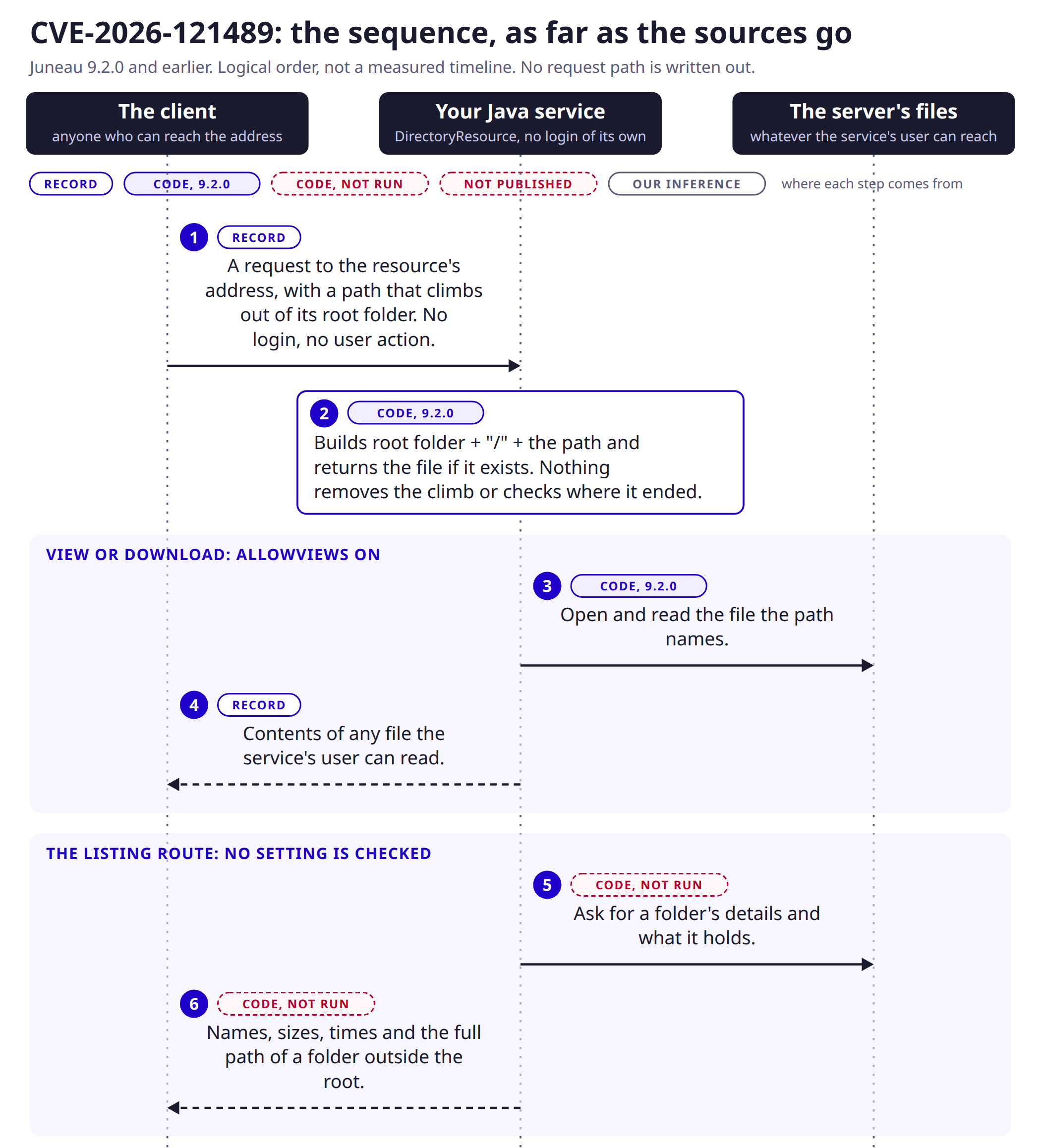
- 11. The requestRecord: network, no login, no user action. A path that climbs out of the resource's root folder. Reachability is your deployment's, not the class's.
- 22. The unsafe path codeCode, 9.2.0: root folder, a slash, the path; the file is returned if it exists. Nothing removes the climb or checks where the result ended.
- 33. View or download reads the fileCode, 9.2.0: needs allowViews on. Reads whatever the path names.
- 44. The contents come backRecord: a client can read files outside the root, anywhere the server process has access.
- 55. The listing route asks for detailsCode, not run: the route that describes a file or folder and lists a folder's contents does not check the three settings.
- 66. Names, sizes, times and the full path come backCode, not run: for a folder outside the root. Not stated by Apache.
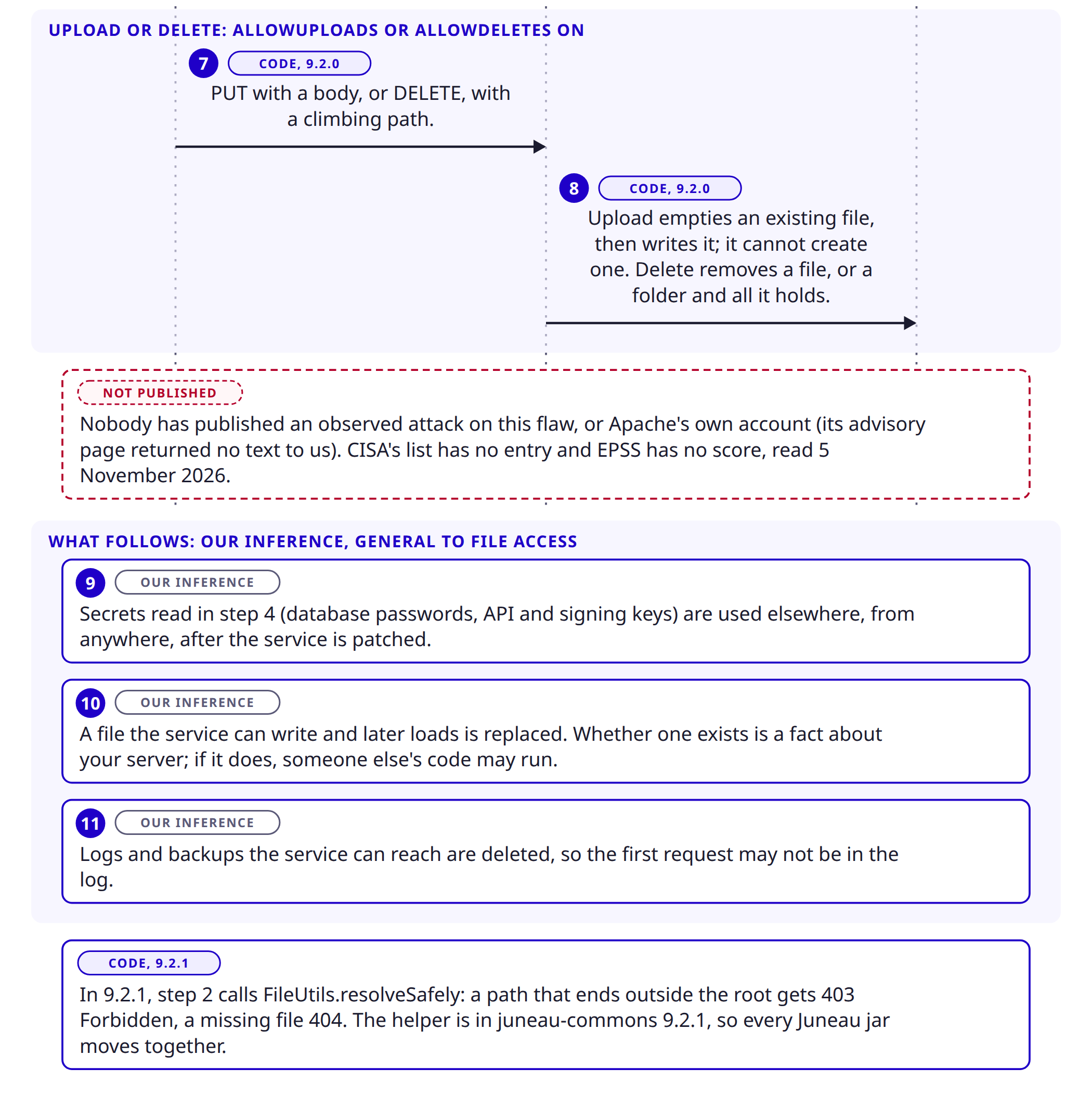
- 77. PUT or DELETE with a climbing pathCode, 9.2.0: PUT needs allowUploads, DELETE needs allowDeletes.
- 88. Upload and delete act on the file systemCode, 9.2.0: upload empties an existing file and writes it, and cannot create one. Delete removes a file, or a folder and everything in it.
- 99. The secrets are used elsewhereOur inference: what step 4 returned (database passwords, API and signing keys) works after the service is patched.
- 1010. A file the service loads is replacedOur inference: needs a file that exists and is writable. If one does, someone else's code may run.
- 1111. Logs and backups are deletedOur inference: the service's own user can delete what it can reach, so the first request may not be in the log.
Nobody has published an observed attack on this flaw, and Apache's own account was not readable to us. Version 9.2.1 changes step 2 only: a path that ends outside the root gets 403 Forbidden and a missing file 404.
Why this is a ten, and what the ten assumes
The vector is network, low complexity, no requirements, no privileges, no user action, then high on confidentiality, integrity and availability of this system and of connected systems. For a single resource that does nothing except touch files, ten reads high until you ask what a process can reach. It can reach what the service account can reach, and in most Java services that is the application's own configuration, keys and data, and often its own code.
The score assumes the resource is reachable and a setting is on. That is the point of the first question for every reader. A service that does not mount the resource has a score of nothing; a service that mounts it on an open port has the full ten.
Which services are in range, and which are not
- Mounted, a setting on, reachable from the internet: in range, the worst case.
- Mounted, a setting on, reachable only from inside: in range. Inside is not a defence against a compromised workstation or a malicious colleague.
- Mounted, all three off: by the record, not affected; by our reading of the code, the listing route is reachable. Upgrade, and treat it as exposed until you have.
- Not mounted anywhere: not exposed to this CVE, even if the jar is on the class path. Say where you looked.
- Not in your own code but in a product you bought: you cannot see the mount. Ask.
Why finding it is harder than usual
A Java library does not announce itself. The dependency may be direct, may arrive through another library, or may be packed inside a single bundled jar or a web archive, which hides it from a scan of the build file. Container images hold the jars without a build file at all. And the thing that matters is not the jar but a line of configuration or code that mounts one class from it.
The checks below are read-only. They are our suggestions, built from the names in the record and the code; they are not published indicators.
# 1. Is Juneau in the dependency tree? (Maven, then Gradle)
mvn dependency:tree -Dincludes=org.apache.juneau
./gradlew dependencies | grep -i juneau

# 2. Is it inside a bundled jar or web archive, or already deployed?
unzip -l your-app.war | grep -i juneau
unzip -l your-app.jar | grep -i 'org/apache/juneau/microservice/resources/DirectoryResource'
find / -name 'juneau-*.jar' 2>/dev/null

# 3. Is the resource mounted, and are the settings on? (run in the source and the config folders)
grep -rn 'DirectoryResource' . --include='*.java' --include='*.cfg' --include='*.properties' --include='*.xml' --include='*.yml'
grep -rn 'allowViews\|allowUploads\|allowDeletes' . --include='*.cfg' --include='*.properties' --include='*.java' --include='*.yml'
The first two tell you whether Juneau is there and at which version. The third tells you whether the resource is mounted and whether a setting is on; the setting names are the ones in the 9.2.0 source. A hit on the class name with no setting is still a mount. If you hold only a container image, run the second set against its unpacked layers, or against the application folder inside it.
What follows if it is used: in time order
This is general to reading, replacing and deleting files as the service's own user. It is not a published account of attacks on this flaw, and no attack on it is recorded.
| When | What the attacker can do | What the owner can see | What it means for the business and its data |
|---|---|---|---|
| Minutes | Read files the service can read: its configuration, with database passwords, API keys and signing keys; its logs; the data folders it uses. Learn the layout of the machine from the listing. | Nothing in the application. A normal-looking request in the web server's access log, if you keep it. | The secrets are exposed from this moment. They work from anywhere, long after the service is patched. |
| Hours | Use what was read: connect to the database, call the APIs, sign something. Replace a file the service will load, if one is writable. | Logins from unfamiliar addresses at the database or the provider; a file whose modified time you cannot explain. | The incident moves from one service to whatever the secrets open. |
| Hours to days | Delete or empty files: data, logs, backups the service can reach, including the logs that would have recorded the access. | Missing or empty files; a service that stops; logs that end early. | Availability and evidence are lost together. A folder deleted on a service that keeps its backups on the same machine can mean no backup. |
| Weeks | Return with the credentials. Reuse them where people reuse passwords. Hand the access on. | A second incident after the first looked closed. | The cost repeats. Questionnaires and insurers ask when you patched and whether you rotated. |
Two points come out of the table. What is taken in the first minute cannot be un-taken by upgrading, so rotation is part of the fix whenever there is a reason to think the resource was open. And an attacker who can delete can remove the log that would have shown the first request, so keep logs somewhere the service cannot reach.
What each common safeguard does and does not stop
A frequent reassurance is that large organisations are protected by layers around the application. That is true of some and not of others, and a layer helps against this flaw only in the way the code lets it. The table takes each in turn. It is our reading of the code and general practice, not a test of any product.
| Safeguard | What it stops here | What it does not stop |
|---|---|---|
| The service runs as an unprivileged user, not as root or Administrator | Reads of operating-system secrets such as the system password file; changes to system files; the damage a delete can do outside the service's own reach. | Everything the service itself can read and write. That is its configuration, its keys, its data and often its own code, which is exactly what the resource exposes. |
| A container with a read-only root filesystem | Replacing or deleting files on the read-only part, which includes most of the application's own code. | Reads of anything the process can read. Any folder mounted writable, such as an upload or data volume, stays open. Secrets mounted into the container as files are readable by the process. |
| A web application firewall or gateway rule against '..' and encoded forms | A plain climbing path, if the rule sees the path as the application will. | What it cannot see. The resource also takes its action as a request parameter (the page's own links use ?method=VIEW), so a rule that watches only the request method misses it, and a path can be written in more than one encoding. A second layer, not the fix. |
| Keeping the real data in separate storage (object storage, a file server) | Data that is not on this machine is not reachable through this machine. | The escape leaves the folder whatever the folder holds. An empty root does not help: the climb goes to the server's own files, which are the configuration and the keys, and those open the separate storage. |
| Host monitoring or an endpoint agent | Some of what follows if the attacker gets code running: a new process, an unusual connection. | The flaw itself. A Java process reading and writing files through its own web resource is its normal behaviour. The first signal is in the web server's access log, not in process telemetry. |
| The resource is not reachable from outside (an internal address, a VPN, an allow list) | Anyone not on that network. | Anyone who is: a compromised laptop, a contractor, a script on a neighbouring service. |
The safest summary we can offer: the layers narrow what an attacker reaches, and none of them removes the fault. Only the upgrade, or taking the resource out of service, does.
Things people will get wrong
- "The three settings are off by default, so we are fine." Only if nobody on any team ever turned one on, and the 9.2.0 listing route does not check them. Read the configuration and the code, then upgrade.
- "We only use Juneau to produce JSON." Then you probably have the jar and not the resource, and the score does not apply to you. Say where you looked, because 'probably' is not a finding.
- "Upgrading juneau-microservice-core is enough." Not on our reading. The fixed core calls a method that is in juneau-commons 9.2.1. Move every org.apache.juneau jar to the same version.
- "It cannot create a file, so it cannot plant a web shell." Right about creating. It can replace a file that exists and the process can write, and that is a different route to the same place. It also destroys.
- "There is no exploit yet, so we have time." The record is a few hours old and the fix is public. That is a reason to patch in days, not to wait for a listing.
- "Our firewall blocks '..'." That is a layer; see the table. It does not remove the fault.
- "It is only a bank problem" or any other sector. We found nothing that names who runs Juneau, and a library does not care who is on the other end of the request.
- "We are on 9.2.1, so we are clean." You are fixed. You are not checked: if the resource was reachable on an older version for any length of time, look at the logs for that time.
How we would triage it
This is our judgement, built on the facts above.
- Find every Java service you own or buy, including the forgotten ones: an admin tool, a reporting service, a vendor appliance. An unknown service is an unpatched one.
- For each, answer two questions in writing: is Juneau in it, and is DirectoryResource mounted. 'We could not tell' is an answer; it goes on the vendor list.
- Rank by reach: reachable from the internet first, then from the internal network, then not reachable.
- Copy before you change: keep the service's current configuration and its logs, so the upgrade does not overwrite what you are about to read.
- Upgrade every org.apache.juneau jar to 9.2.1, then read the version from the running service, not from the build file.
- For services that were reachable, read the access logs, and rotate the secrets if there is any reason to doubt.
Step 1: find Juneau and the resource
Use the three checks in 'Why finding it is harder than usual'. Write down, for each service, the Juneau version, whether the resource is mounted, which settings are on, and who can reach the address.
Step 2: upgrade, all of it, to 9.2.1
In Maven, set one version for every org.apache.juneau dependency (if your build uses a bill of materials, set it there), run the build, and redeploy. In Gradle the same. If the service is a vendor's, ask for the build that carries 9.2.1.
# After the build: list what actually ended up in the package, not what the file asked for
mvn dependency:tree -Dincludes=org.apache.juneau
unzip -l target/your-app.war | grep -i 'juneau-'
The package is not the running service. A build can be right while a container image, a bundled jar or an older deployment is not. Check what is running: list the Juneau jars inside the running container or on the host (the commands in the finding section work there too), including jars nested inside a larger jar, and confirm every one reads 9.2.1. A dependency tree that says 9.2.1 proves what you built, not what is serving requests.
If you cannot upgrade today, the vendor's text offers no workaround other than upgrading. Our suggestions, which the vendor has not endorsed and we have not tested: remove the mount, or turn the three settings off and also keep the address away from anyone who does not need it (an allow list, a VPN, a login at the edge). The second part matters because of the listing route. Neither is a fix.
Step 3: read the access logs for the resource
These are starting searches, not complete detection rules. Validate them against your own reverse proxy, application server and the request format your Juneau service actually receives, because a path can be normalised before it is logged and the HTTP method seen at the edge may differ from the action the resource reads. The commands only read. The paths are examples; use the ones your server writes. The patterns look for requests that climb out of a folder, in the plain and the encoded forms, and for the custom verbs this resource uses. Replace RESOURCE with the address your application mounts it at.
# Requests to the resource that contain a climbing path, plain or encoded
grep -E 'RESOURCE.*(\.\./|%2e%2e|%2E%2E|\.\.%2f|%2e\.)' /var/log/nginx/access.log* /var/log/apache2/access.log* 2>/dev/null | head -100

# Every non-GET request to the resource: uploads and deletes should be rare and known
grep -E '"(PUT|DELETE|POST|VIEW|DOWNLOAD) [^ ]*RESOURCE' /var/log/nginx/access.log* /var/log/apache2/access.log* 2>/dev/null | head -100

# The same through the method parameter
grep -E 'RESOURCE.*[?&]method=(VIEW|DOWNLOAD|DELETE)' /var/log/nginx/access.log* /var/log/apache2/access.log* 2>/dev/null | head -100
A hit is a lead, not a finding. Your application server and the reverse proxy in front may normalise a path before it is logged, so a clean log does not prove a clean history; we have not tested what yours do. A request to a file the service has no reason to serve (its configuration, a key, an environment file) is the stronger signal. Log retention matters: if you keep a week, you can only speak for a week.
Step 4: if you find something
- Copy the logs and the service's folders to a place the service cannot write to, then isolate the service from the network. Do not delete first.
- Assume what the service could read: its configuration, database passwords, API keys, signing keys, the data it serves. Rotate them, in the order of what each opens.
- Compare the files the service can write with a known good copy of the build and the configuration. Rebuild from a clean image where the data justifies it.
- Check the backups the service can reach: a delete could have taken them.
- Tell the person who handles breach notification the same day, with the dates you found. The clock may already be running.
The first-15-seconds page is a one-page plan for the first minutes of a suspected compromise, and it applies here.
Detecting it: where the signal is
Nobody has published an indicator for this flaw, and we do not make one up. The signals follow from the code.
- 1Request: a path that climbs out of the folderSource: the web server or proxy access log. A path under the resource containing '..' or an encoding of it, a PUT or DELETE where only reads are normal, or the custom verbs VIEW and DOWNLOAD. Weak alone: scanners send climbing paths all day. Strong when the request was answered with success.
- 2Response: success for a file that is not the service'sSource: the same log, the status code and the size. A 200 for a path to a configuration or key file, or a large body for a path that normally returns a report. The fixed version would answer 403 for these.
- 3File: a change that nothing in your process explainsSource: file integrity monitoring, or a comparison against the build. A script, template or configuration file whose modified time moves with no deployment. A file emptied by an upload, a folder gone.
- 4Use: the secrets turning up in useSource: the database, the provider's logs, the identity system. A login with the service's own credentials from an address the service never uses. This is the signal that arrives last and proves most.
| What you see | Reading | What a person does |
|---|---|---|
| A climbing path with a failure status | Probing. It also happens to services that do not run Juneau. | Keep the line. Check that the resource is not mounted or is on 9.2.1. |
| A climbing path with success, for a file outside the folder | Probable. The service gave a file it should not have. | Preserve the logs and the file. Treat the secrets in that file as exposed and rotate them. |
| A success on PUT or DELETE with a climbing path, or a file that changed with no deployment | Treat as a compromise. | Contain now; copy the evidence; rebuild from a clean copy. |
| The service's secrets used from somewhere new, with no request in the logs | High suspicion of compromise, from some route. Logs may have been deleted or may not reach back. | Confirm the use is not yours. If it is not, find how: this flaw, a stolen password, another hole. |
| Nothing | Not proof of safety. A path can be normalised before it is logged, and logs rotate. | Do the version and file checks anyway. |
What the signals map to in ATT&CK
The mapping is ours. MITRE and CISA have not published one for this CVE, so read each line as 'likely'. The request: T1190 Exploit Public-Facing Application. Reading the configuration and key files: T1552.001 Credentials In Files. Replacing a file the service loads: T1565.001 Stored Data Manipulation, or, if the file is a script, T1059 Command and Scripting Interpreter. Deleting data or logs: T1485 Data Destruction and T1070 Indicator Removal. Use of the stolen secrets: T1078 Valid Accounts.
What this cannot do
- It cannot give you the exact request that reaches this resource through your proxy and your application server. That depends on how each normalises a path, and we have not tested yours.
- It only sees what you log, and an attacker who can delete can remove the lines.
- It does not prove the flaw was used. A match is a lead for an analyst, not a finding.
If you hold the product, not the build
A fair share of exposure will sit in products where the Juneau is a jar the supplier chose. You cannot read their configuration. You can ask, in writing, for answers you can file.
What to send your provider or vendor today
We run your software, or you run our services. Apache published CVE-2026-121489 on 5 November 2026: a path traversal in Apache Juneau's DirectoryResource, versions through 9.2.0, CVSS 4.0 score 10, fixed in 9.2.1 (juneau-microservice-core and juneau-commons). Please tell us in writing, for each system you run for us or supply to us: (1) whether any component uses Apache Juneau, and which version of each org.apache.juneau jar is deployed; (2) whether DirectoryResource is mounted, and if so which of allowViews, allowUploads and allowDeletes is on and who can reach its address; (3) the date the system reaches 9.2.1 across every Juneau jar; (4) whether the access logs for the resource were searched for requests that leave its folder, back to when it was first deployed, and what was found; and (5) whether any secret the system can read was rotated. If you cannot answer today, tell us when you can.
What we do not know yet
- How the vendor describes it. The advisory the record points to is on a mailing-list site that gave us no readable text, so we have the record and the code and not the vendor's own explanation.
- Whether the listing route is reachable with every setting off. It is our reading of the source, not Apache's statement, and we have not run it.
- Whether a typical application server or proxy in front of a Juneau service passes a climbing path through unchanged. We have not tested one, and the vendor scores the flaw as easy to use over a network.
- Which services mount the resource, and how many run Juneau at all. No public data we read answers either.
- Whether anything before 8.0.0 is affected. The record says 'through 9.2.0' with no lower bound; we read six releases from 8.0.0 on and no earlier one.
- Whether anyone is using it. The catalogue has no entry and EPSS has no score yet; both were read on 5 November 2026 and both will change.
- How the researcher found it, and whether others hold it. The record names a finder and no timeline beyond its own dates.
If you take one thing from this: find out whether the resource is mounted before you decide how urgent it is, upgrade every Juneau jar to the same version, and where it was ever reachable, read the logs and rotate what the service could read.
The weakness behind it
The record classes this as CWE-22: a file path built from outside input without keeping it inside an intended folder.
Check your own project
If you build software, you can compare what a project declares with this CVE from a terminal. The tool reads requirements files, package.json, Maven, Gradle, Cargo, CMake and Dockerfile files, runs nothing, and only the CVE id leaves your machine. Naming the CVEs needs no key.
lattice-scan project . --cve CVE-2026-121489Each row says in-range, outside-range, undetermined or lead, with the file and line. That is evidence about what a manifest declares, not about what runs or whether the resource is mounted, and a person decides.
- Which way into Lattice fits your job →The command line, the Claude skill or the MCP server: what each needs, what works without a key and how to read the result.
- Lattice, the MCP server →The public graph the command reads, for AI agents over MCP.
Read next
Sources
- CVE-2026-121489 record (CNA: Apache): description, CWE-22, affected packages and ranges, CVSS 4.0 vector and score, references
- Apache's advisory, the reference in the CVE record (a script-driven page; we could not read its text)
- CISA Known Exploited Vulnerabilities catalogue (no entry for CVE-2026-121489 when read on 5 November 2026)
- FIRST EPSS, CVE-2026-121489 (no score when read on 5 November 2026)
- Maven Central, org.apache.juneau:juneau-microservice-core: release list and the -sources jars for 8.0.0, 8.2.0, 9.0.0, 9.0.1, 9.1.0, 9.2.0 and 9.2.1 (DirectoryResource.java)
- The 9.2.0 source jar, DirectoryResource.java (lines cited in the note): juneau-microservice-core-9.2.0-sources.jar
- The 9.2.1 source jars: DirectoryResource.java and FileUtils.resolveSafely (juneau-commons-9.2.1-sources.jar)
- Maven Central, org.apache.juneau:juneau-commons: 9.2.0 and 9.2.1 (FileUtils.java, the fix's helper)
- Apache Juneau project site (what the project is; latest release 9.2.1, dated 2026-11-03)
- MITRE ATT&CK: T1190, T1552.001, T1565.001, T1059, T1485, T1070, T1078. ATT&CK is a registered trademark of The MITRE Corporation. Technique names are reproduced and distributed with the permission of The MITRE Corporation under the ATT&CK Terms of Use.
- MITRE CWE-22: Improper Limitation of a Pathname to a Restricted Directory